
Per Stenebo
2017-09-21 19:10:01
2024-04-06 07:47:47

Kameror
Raspberry Pi Camera Module
| elinux | docs | tutorial | motion-mmal |
Aktivera /dev/video0
sudo modprobe bcm2835-v4l2
Aktivera /dev/video0 permanent:
sudo nano /etc/modules Lägg till texten bcm2835-v4l2
Användning
fswebcam --device v4l2:/dev/video1 --resolution 640x480 test1.jpg
Funkar i webbkameraprogrammet cheese med max upplösning 640x480 i Ubuntu 16.04.
Webbkamera Biltema 24-749 (24749)

Upplösning 640x480 pixlar. Manuell ratt för fokus. 6 st vita lysdioder för belysning inbyggda i kamerahuset med ratt för inställning av ljusstyrka på USB-kabeln. Inbyggd mikrofon. Kameran ger väldigt ljusa bilder utomhus.
Linux (Raspberry Pi med Raspbian 7.8, linux kärna 4.0.8-v7+)
lsusb ger Bus 001 Device 004: ID 0c45:6340 Microdia
Monteras automatiskt på /dev/video0
arecord -l
**** List of CAPTURE Hardware Devices ****
card 1: Camera [USB 2.0 Camera], device 0: USB Audio [USB Audio]
  Subdevices: 1/1
  Subdevice #0: subdevice #0
lsusb -s 001:004 -v | egrep "Width|Height"
Couldn't open device, some information will be missing
        wWidth                            640
        wHeight                           480
        wWidth                            352
        wHeight                           288
        wWidth                            320
        wHeight                           240
        wWidth                            176
        wHeight                           144
        wWidth                            160
        wHeight                           120
avconv indikerar audio: pcm_s16le, 48000 Hz, stereo, s16, 1536 kb/s
Inspektionskamera
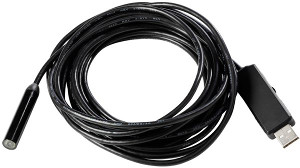
Biltema 15343. Bilden är bara skarp mellan ungefär 4-6 cm avstånd till objektet.
5 m flexibel kamerakabel
vattentätt kamerahuvud (IP67), Ø 10 mm
Justerbar LED-belysning
Kameraupplösning: 1280x720 pixels, 30fps eller 1600x1200 pixels, 12fps
Rotation: 60°
USB-anslutning
Tillbehör: Upplocknings krokar, magneter och inspektionsspegel som fästs på kamerahuvudet.
lsusb ger
ID 090c:f37d Silicon Motion, Inc. - Taiwan (formerly Feiya Technology Corp.) Endoscope camera
Användning
fswebcam --device v4l2:/dev/video1 --resolution 1280x720 test5.jpg
Funkar i webbkameraprogrammet cheese med upplösning 1280x720 i Ubuntu 16.04 eller 640x480 i Ubuntu 14.04.
Webbkamera Biltema 24-759 (24759)

Inbyggd mikrofon, separat kabel med 3,5 mm kontakt. Stativ för bord/plattskärm, 6 st LED lampor. 1,2 m USB-kabel. Manuell fokusering. Stillbildsfunktion. Videoupplösning: 2 megapixel, fotoupplösning: 8 megapixel.
Verkar fungera i Linux med standard UVC-drivrutiner, max upplösning 640x480.
lsusb ger Bus 002 Device 004: ID 05e3:0510 Genesys Logic, Inc.
avprobe på video inspelad med cheese (standard inställningar):
Input #0, matroska,webm, from 'Video/Webcam/2015-07-26-132741.webm':
  Duration: 00:00:05.15, start: 0.000000, bitrate: N/A
    Stream #0.0(eng): Video: vp8, yuv420p, 640x480, PAR 1:1 DAR 4:3, 21.92 fps, 100 tbr, 1k tbn (default)
    Metadata:
      title           : Video
    Stream #0.1(eng): Audio: vorbis, 44100 Hz, mono, fltp (default)
    Metadata:
      title           : Audio
Med samma webbkamera (samma artikelnummer) inköpt 2017-04-29, i Ubuntu 16.04 x86_64, gav lsusb annat resultat:
ID 1e4e:0110 Cubeternet
syslog efter anslutning; tail /var/log/syslog
Apr 30 07:08:25 xps kernel: [ 8542.057497] usb 1-2: new high-speed USB device number 6 using xhci_hcd
Apr 30 07:08:26 xps kernel: [ 8542.465495] usb 1-2: new high-speed USB device number 7 using xhci_hcd
Apr 30 07:08:27 xps kernel: [ 8543.235060] usb 1-2: New USB device found, idVendor=1e4e, idProduct=0110
Apr 30 07:08:27 xps kernel: [ 8543.235064] usb 1-2: New USB device strings: Mfr=1, Product=2, SerialNumber=0
Apr 30 07:08:27 xps kernel: [ 8543.235066] usb 1-2: Product: USB2.0 Camera
Apr 30 07:08:27 xps kernel: [ 8543.235068] usb 1-2: Manufacturer: Etron Technology, Inc.
Apr 30 07:08:27 xps kernel: [ 8543.240623] uvcvideo: Found UVC 1.00 device USB2.0 Camera (1e4e:0110)
Apr 30 07:08:27 xps kernel: [ 8543.246251] input: USB2.0 Camera as /devices/pci0000:00/0000:00:14.0/usb1/1-2/1-2:1.0/input/input21
Apr 30 07:08:27 xps mtp-probe: checking bus 1, device 7: "/sys/devices/pci0000:00/0000:00:14.0/usb1/1-2"
Apr 30 07:08:27 xps mtp-probe: bus: 1, device: 7 was not an MTP device
Lista tillgängliga alternativ med fswebcam:
fswebcam --device /dev/video1 --list-controls
--- Opening /dev/video1...
Trying source module v4l2...
/dev/video1 opened.
No input was specified, using the first.
Available Controls        Current Value   Range
------------------        -------------   -----
Brightness                0 (50%)         -127 - 127
Contrast                  64 (50%)        0 - 127
Saturation                77 (30%)        0 - 255
Hue                       0 (50%)         -16000 - 16000
White Balance Temperature, Auto True            True | False
Gamma                     100 (17%)       16 - 500
Power Line Frequency      50 Hz           Disabled | 50 Hz | 60 Hz
White Balance Temperature 5200 (64%)      2800 - 6500
Sharpness                 2 (6%)          0 - 31
Exposure, Auto            Aperture Priority Mode Manual Mode | Aperture Priority Mode
Exposure (Absolute)       625 (12%)       1 - 5000
Exposure, Auto Priority   True            True | False
fswebcam --device v4l2:/dev/video0 --resolution 640x480 test2.jpg
	--- Opening v4l2:/dev/video0...
	/dev/video0 opened.
	No input was specified, using the first.
	--- Capturing frame...
	Captured frame in 0.00 seconds.
	--- Processing captured image...
	Writing JPEG image to 'test2.jpg'.